[index] AT-TQ6702e GEN2-R コマンドリファレンス 5.5.5
NoteローカルAP用とリモートAP用の無線関連コマンドは実際には共通ですが、ローカルAPを設定するときとリモートAPを設定するときでサポートされるオプションや注意事項が異なるものがあるため、前記のとおり掲載する章を分けたうえでローカルAP用のコマンドにはコマンド名の末尾に (local) を付けて区別しています。
例:
- vap(local)コマンド(APプロファイル・無線モード) - ローカルAP設定用(「無線機能」章に掲載)
- vapコマンド(APプロファイル・無線モード) - リモートAP設定用(「無線LANコントローラー(AWC対応)」章に掲載)
Noteリモート(本製品以外)の無線LANコントローラーによって管理されている本製品(TQRシリーズ)では自動的な設定保存が行われないため、管理下に入ったタイミングでwireless ap-configuration pull ap local(local)コマンドを実行し、設定を保存することをおすすめします。
また、管理下にあるTQRシリーズを再起動する際も、事前にwireless ap-configuration pull ap local(local)コマンドを実行し、設定を保存してから再起動してください。
NoteCLIで無線機能の設定変更を行った場合は、必ずwireless ap-configuration apply ap local(local)コマンドを実行し設定変更の適用を行ってください。Web GUIの詳細は「Web GUI」/「無線設定」をご覧ください。
awplus# configure terminal ↓
Enter configuration commands, one per line.  End with CNTL/Z.
awplus(config)#
awplus(config)# wireless ↓
awplus(config-wireless)#
awplus# wireless ap-configuration apply ap local ↓
awplus# show wireless ap-profile ↓
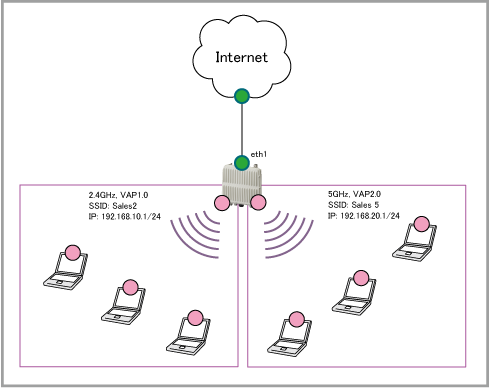
| eth1 | (※1) | WAN側物理インターフェース |
| vap1.0 (2.4GHz) | 192.168.10.1 | 無線ネットワーク Sales2 はこのVAPに所属 |
| vap2.0 (5GHz) | 192.168.20.1 | 無線ネットワーク Sales5 はこのVAPに所属 |
| Sales2 | 1 | WPAパーソナル | WPA3 | CCMP(AES) | passphrase_for_sales2 |
| Sales5 | 17 | WPAパーソナル | WPA3 | CCMP(AES) | passphrase_for_sales5 |
awplus(config)# interface vap1.0 ↓
awplus(config-if)# ip address 192.168.10.1/24 ↓
awplus(config-if)# exit  ↓

awplus(config)# interface vap2.0 ↓
awplus(config-if)# ip address 192.168.20.1/24 ↓
awplus(config-if)# end ↓

awplus# wireless ap-configuration apply ap local ↓
wireless
 security 1 mode wpa-personal
  key encrypted t6DZN4s5xvnKFe0jeHyFqMc/61/VMvlodNf0S4nY9Hk=
  versions wpa3
  management-frame-protection enable type required
 security 2 mode wpa-personal
  key encrypted t6DZN4s5xvnKFe0jeHyFqIDCt+zj2J2FXdvYe3UMo70=
  versions wpa3
  management-frame-protection enable type required
 network 1
  ssid Sales2
  security 1
 network 17
  ssid Sales5
  security 2
 ap-profile local
  radio 1
   enable
   multicast-tx-rate 11
   vap 0 network 1
  radio 2
   enable
   multicast-tx-rate 6
   vap 0 network 17
 ap local
Note本手順では無線の設定はWeb GUIを使用して行っていますが、無線の設定をCLIで行う場合はVAPの設定後にwireless ap-configuration apply ap local(local)コマンドを実行してください。VAPを作成した後にブリッジを作成してVAPに適用する場合は、VAP作成後に無線適用が必須となります。
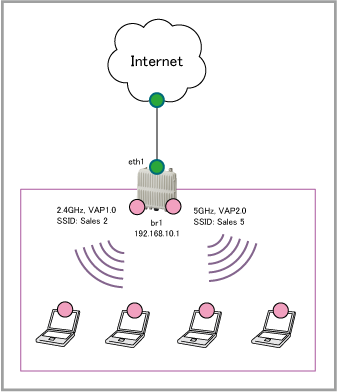
| eth1 | (※1) | WAN側物理インターフェース |
| vap1.0 (2.4GHz) | N/A | 無線ネットワーク Sales2 はこのVAPに所属 |
| vap2.0 (5GHz) | N/A | 無線ネットワーク Sales5 はこのVAPに所属 |
| br1 | 192.168.10.1 | VAP1.0、VAP2.0 が所属するソフトウェアブリッジ |
| Sales2 | 1 | WPAパーソナル | WPA3 | CCMP(AES) | passphrase_for_sales2 |
| Sales5 | 17 | WPAパーソナル | WPA3 | CCMP(AES) | passphrase_for_sales5 |
awplus(config)# bridge 1 ↓

awplus(config)# interface br1 ↓
awplus(config-if)# ip address 192.168.10.1/24 ↓
awplus(config-if)# exit ↓

awplus(config)# interface vap1.0 ↓
awplus(config-if)# bridge-group 1 ↓
awplus(config-if)# exit ↓

awplus(config)# interface vap2.0 ↓
awplus(config-if)# bridge-group 1 ↓
awplus(config-if)# end ↓

awplus# wireless ap-configuration apply ap local ↓
wireless
 security 1 mode wpa-personal
  key encrypted t6DZN4s5xvnKFe0jeHyFqMc/61/VMvlodNf0S4nY9Hk=
  versions wpa3
  management-frame-protection enable type required
 security 2 mode wpa-personal
  key encrypted t6DZN4s5xvnKFe0jeHyFqIDCt+zj2J2FXdvYe3UMo70=
  versions wpa3
  management-frame-protection enable type required
 network 1
  ssid Sales2
  security 1
 network 17
  ssid Sales5
  security 2
 ap-profile local
  radio 1
   enable
   multicast-tx-rate 11
   vap 0 network 1
  radio 2
   enable
   multicast-tx-rate 6
   vap 0 network 17
 ap local
Note本手順では無線の設定はWeb GUIを使用して行っていますが、無線の設定をCLIで行う場合はVAPの設定後にwireless ap-configuration apply ap local(local)コマンドを実行してください。VAPを作成した後にブリッジを作成してVAPに適用する場合は、VAP作成後に無線適用が必須となります。
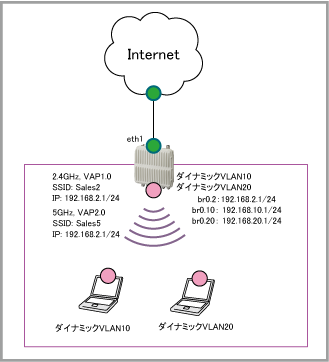
| eth1 | (※1) | WAN側物理インターフェース |
| vap1.0 (2.4GHz) | N/A | 無線ネットワーク Sales2 はこのVAPに所属 |
| vap2.0 (5GHz) | N/A | 無線ネットワーク Sales5 はこのVAPに所属 |
| br0.2 | 192.168.2.1 | VLAN ID2のパケットを送受信するためのサブインターフェース |
| br0.10 | 192.168.10.1 | VLAN ID10のパケットを送受信するためのサブインターフェース |
| br0.20 | 192.168.20.1 | VLAN ID20のパケットを送受信するためのサブインターフェース |
| Sales2 | 1 | WPAエンタープライズ | WPA3 | CCMP(AES) |
| Sales5 | 17 | WPAエンタープライズ | WPA3 | CCMP(AES) |
| 2 | 固定 | 認証済み端末、VLAN情報無し |
| 10 | 動的(ダイナミックVLAN) | 認証済み端末、VLAN情報有り |
| 20 | 動的(ダイナミックVLAN) | 認証済み端末、VLAN情報有り |
awplus(config)# interface br0 ↓
awplus(config-if)# encapsulation dot1q 2 ↓
awplus(config-if)# encapsulation dot1q 10 ↓
awplus(config-if)# encapsulation dot1q 20 ↓
awplus(config-if)# exit ↓

awplus(config)# interface br0.20 ↓
awplus(config-if)# ip address 192.168.20.1/24 ↓
awplus(config-if)# exit ↓

awplus(config)# interface br0.10 ↓
awplus(config-if)# ip address 192.168.10.1/24 ↓
awplus(config-if)# exit ↓

awplus(config)# interface br0.2 ↓
awplus(config-if)# ip address 192.168.2.1/24 ↓
awplus(config-if)# exit ↓

awplus(config)# interface vap1.0 ↓
awplus(config-if)# bridge-group 0 native vlan 2 ↓
awplus(config-if)# exit ↓

awplus(config)# interface vap2.0 ↓
awplus(config-if)# bridge-group 0 native vlan 2 ↓
awplus(config-if)# end ↓

awplus# wireless ap-configuration apply ap local ↓
wireless
 security 1 mode wpa-enterprise
  versions wpa3
  radius authentication group radius
  radius accounting group radius
  ciphers ccmp
  management-frame-protection enable type required
  dynamic-vlan enable
 security 2 mode wpa-enterprise
  versions wpa3
  radius authentication group radius
  radius accounting group radius
  ciphers ccmp
  management-frame-protection enable type required
  dynamic-vlan enable
 network 1
  ssid Sales2
  security 1
 network 17
  ssid allied5
  security 2
 ap-profile local
  radio 1
   enable
   multicast-tx-rate 11
   vap 0 network 1
  radio 2
   enable
   multicast-tx-rate 6
   vap 0 network 17
 ap local
(C) 2025 アライドテレシスホールディングス株式会社
PN: 613-003429 Rev.B