設定例集#232a: Passpointを使用したOpenRoaming対応無線ネットワーク設定とインターネット接続設定
OpenRoaming対応Wi-Fiスポットとして、無線端末にインターネットアクセスを提供するための設定例です。インターネットサービスプロバイダー(ISP)との接続にはPPPoEを使用します。
LAN側ネットワークの無線セキュリティーには、OpenRoamingを提供しているサービス側のRADIUSサーバーで認証を行うWPAエンタープライズを使用します。
OpenRoamingの認証基盤に対する接続情報の登録は、本製品のPasspoint機能を使用します。
また、OpenRoamingによる無線環境に加えてマネージメント用セグメントを作成し、無線セキュリティーとしてWPAパーソナルを使用します。
本例では6つのVAPを3つのIPセグメントに分け、そのうちの一つをマネージメント用とします。
異なるセグメント間の無線通信はファイアウォールで遮断し、各セグメントからインターネットへの通信のみを許可するよう設定します。
構成
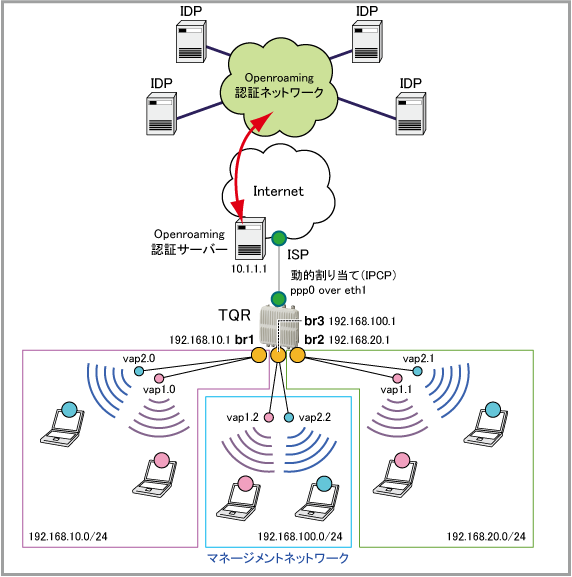
| vap1.0 | 無線1 (2.4GHz) VAP0 | Internet1 | WPAエンタープライズ | - | WPA2 |
| vap1.1 | 無線1 (2.4GHz) VAP1 | Internet2 | WPAエンタープライズ | - | WPA2 |
| vap1.2 | 無線1 (2.4GHz) VAP2 | Management | WPAパーソナル | passphrase3 | WPA3 |
| vap2.0 | 無線2 (5GHz) VAP0 | Internet1 | WPAエンタープライズ | - | WPA2 |
| vap2.1 | 無線2 (5GHz) VAP1 | Internet2 | WPAエンタープライズ | - | WPA2 |
| vap2.2 | 無線2 (5GHz) VAP2 | Management | WPAパーソナル | passphrase6 | WPA3 |
| IEEE 802.11u | Access Network Type | chargeable-public | ネットワークタイプを指定します |
| Internet Access | Enable | インターネットへ接続するかどうかの通知を指定します | |
| Homogeneous ESS Identifier | 0000.0000.0000 | Homogeneous ESS Identifierを指定します | |
| Roaming Consortium List | 2233445566, 021122 | ローミング・コンソーシアムリストを指定します | |
| Domain Name | example.com, another.example.com, yet-another.example.com | 証明書に使用されているドメイン名を指定します | |
| NAI Realm Information | tokyo.example.com | NAI(Network Access Identifier)Realm名を指定し、EAPの種別を選択します | |
| NAI Realm Information eap-method | ttls | ||
| Hotspot2.0 | Operator Language Code | eng | サービスを提供しているオペレーター名を言語コードを含めて指定します |
| Operator Friendly Name | Allied FREE Wi-Fi | ||
| ISP接続用ユーザー名 | user@isp |
| ISP接続用パスワード | isppasswd |
| PPPoEサービス名 | 指定なし |
| WAN側IPアドレス | 動的割り当て(IPCP) |
| DNSサーバー | 自動取得(IPCP) |
| br1 | vap1.0 vap2.0 |
| br2 | vap1.1 vap2.1 |
| br3 | vap1.2 vap2.2 |
| WAN側物理インターフェース | eth1 |
| WAN側(ppp0)IPアドレス | 接続時にISPから取得 |
| LAN側(br1)IPアドレス | 192.168.10.1/24 |
| LAN側(br2)IPアドレス | 192.168.20.1/24 |
| LAN側(br3)IPアドレス | 192.168.100.1/24 |
| DHCPサーバー機能 | 有効 |
| リース時間 | 2時間 |
| 対象サブネット | 192.168.10.0/24 |
| デフォルトゲートウェイ | 192.168.10.1 |
| DNSサーバー | 192.168.10.1 |
| 提供するIPアドレスの範囲 | 192.168.10.100~192.168.10.131(32個) |
| リース時間 | 2時間 |
| 対象サブネット | 192.168.20.0/24 |
| デフォルトゲートウェイ | 192.168.20.1 |
| DNSサーバー | 192.168.20.1 |
| 提供するIPアドレスの範囲 | 192.168.20.100~192.168.20.131(32個) |
| リース時間 | 2時間 |
| 対象サブネット | 192.168.100.0/24 |
| デフォルトゲートウェイ | 192.168.100.1 |
| DNSサーバー | 192.168.100.1 |
| 提供するIPアドレスの範囲 | 192.168.100.100~192.168.100.131(32個) |
設定開始前に
自動設定の確認と削除
本設定例に掲載されているコマンドは、設定がまったく行われていない本製品の初期状態(スタートアップコンフィグなしで起動した状態)から入力することを前提としています。そのため、通常は erase startup-config を実行し、スタートアップコンフィグが存在しない状態で起動してから、設定を始めてください。
ただし、本製品はスタートアップコンフィグなしで起動した場合でも、特定の条件を満たすと自動的な設定を行うことがあるため、その場合は設定例にしたがってコマンドを入力しても、コマンドがエラーになったり、全体として意図した動作にならない可能性があります。
これを避けるため、設定開始にあたっては「自動的な設定内容の削除」にしたがい、自動設定を手動で削除してから設定を行うことをおすすめします。
自動設定が行われる条件などの詳細については、AMF応用編のAMFネットワーク未検出時の拡張動作をご参照ください。
システム時刻の設定
ログなどの記録日時を正確に保ち、各種機能を適切に動作させるため、システム時刻は正確にあわせて運用することをおすすめします。特に本製品はリアルタイムクロックを内蔵していないため、起動するたびに時刻をあわせる必要があります。
ご使用の環境にあわせ、次のいずれかの方法でシステム時刻を設定してください。
- 手動で設定する方法 - 「運用・管理」/「システム」
- NTPで自動設定する方法 - 「運用・管理」/「NTP」
TQRの設定
無線機能の設定
- RADIUSクライアントとして、OpenRoamingサービス提供元の認証サーバーを登録します。
radius-server hostコマンド、aaa group server radiusコマンド、serverコマンドの各コマンドを使います。
RADIUSクライアントの詳細は「運用・管理」/「RADIUSクライアント」をご覧ください。
radius-server host 10.1.1.1 key hogehoge
aaa group server radius WBA
 server 10.1.1.1
- 無線機能の設定を行うため、wireless(local)コマンドで無線設定モードに移動します。
wireless
- 各VAPで使用するセキュリティー設定を作成します。
セキュリティー設定の詳細は「無線機能」/「セキュリティー設定」をご覧ください。
WPAエンタープライズ
・セキュリティー設定(security mode wpa-enterprise(local))
・ローミング時の事前認証情報の中継を無効化(pre-authentication enable(local))
・認証用RADIUSサーバーグループを指定(radius authentication group(local))
・アカウンティング用RADIUSサーバーグループを指定(radius accounting group(local))
WPAパーソナル
・セキュリティー設定(security mode wpa-personal(local))
・セキュリティーキー(key(local))
・WPAバージョン(versions(local))
・管理フレーム保護機能(MFP = Management Frame Protection)を有効化(management-frame-protection enable(local))
 security 1 mode wpa-enterprise
  no pre-authentication enable
  radius authentication group radius
  radius accounting group WBA
 security 2 mode wpa-enterprise
  no pre-authentication enable
  radius authentication group WBA
  radius accounting group WBA
 security 3 mode wpa-personal
  key passphrase3
  versions wpa3
  management-frame-protection enable type required
 security 4 mode wpa-enterprise
  no pre-authentication enable
  radius authentication group WBA
  radius accounting group WBA
 security 5 mode wpa-enterprise
  no pre-authentication enable
  radius authentication group WBA
  radius accounting group WBA
 security 6 mode wpa-personal
  key passphrase6
  versions wpa3
  management-frame-protection enable type required
- 各VAPで使用するネットワーク設定を作成し、Passpointの設定を行います。
Passpointの詳細は「無線機能」/「Passpoint」をご覧ください。
ネットワーク設定
・無線ネットワークモードに移動(network(local))
・SSID(ssid(local))
・SSID非公開(hide-ssid(local))
・バンドステアリング機能(band-steering(local))
・セキュリティー設定(security(local))
・クライアント隔離(client-isolation-mode vap(local))
Passpointの設定
・Passpointモードに移動(passpoint(local))
・Passpoint機能の有効化(enable(local))
・対象無線ネットワークにおけるIEEE 802.11uの設定(dot11u(local))
・ネットワークタイプの指定(network-type(local))
・Homogeneous ESS Identifierの指定(hessid(local))
・ローミング・コンソーシアムリストの指定(roaming-oi(local))
・ドメイン名の指定(domain-name(local)コマンド)
・NAI(Network Access Identifier)Realm情報の設定(nai-realm(local))
・Hotspot2.0の設定(hs20(local))
・オペレーター名の指定(operator lang friendly-name(local))
network 1 ssid Internet1 band-steering security 1 client-isolation-mode vap passpoint enable dot11u network-type chargeable-public hessid 0000.0000.0000 roaming-oi 2233445566,021122 domain-name example.com,another.example.com,yet-another.example.com nai-realm 1 realm-name tokyo.example.com eap-method eap-ttls hs20 operator 1 lang eng friendly-name Allied FREE Wi-Fi network 2 ssid Internet2 band-steering security 2 client-isolation-mode vap passpoint enable dot11u network-type chargeable-public hessid 0000.0000.0000 roaming-oi 2233445566,021122 domain-name example.com,another.example.com,yet-another.example.com nai-realm 1 realm-name tokyo.example.com eap-method eap-ttls hs20 operator 1 lang eng friendly-name Allied FREE Wi-Fi network 3 ssid Management hide-ssid band-steering security 3 client-isolation-mode vap network 17 ssid Internet1 band-steering security 4 client-isolation-mode vap passpoint enable dot11u network-type chargeable-public hessid 0000.0000.0000 roaming-oi 2233445566,021122 domain-name example.com,another.example.com,yet-another.example.com nai-realm 1 realm-name tokyo.example.com eap-method eap-ttls hs20 operator 1 lang eng friendly-name Allied FREE Wi-Fi network 18 ssid Internet2 band-steering security 5 client-isolation-mode vap passpoint enable dot11u network-type chargeable-public hessid 0000.0000.0000 roaming-oi 2233445566,021122 domain-name example.com,another.example.com,yet-another.example.com nai-realm 1 realm-name tokyo.example.com eap-method eap-ttls hs20 operator 1 lang eng friendly-name Allied FREE Wi-Fi network 19 ssid Management hide-ssid band-steering security 6 client-isolation-mode vap - 無線1/2に対して各種機能やVAPの設定を行います。
ap-profile local(local)コマンドでAPプロファイルモードに移動してから、radio(local)コマンドで無線番号を指定して以下のコマンドを実行します。
・無線の有効化(enable(local))
・VAPの設定(vap(local))
・Zero Wait DFS(zero-wait-dfs enable(local))
・マルチキャストパケットの送信レート指定(multicast-tx-rate(local))
 ap-profile local
  radio 1
   enable
   multicast-tx-rate 11
   vap 0 network 1
   vap 1 network 2
   vap 2 network 3
  radio 2
   enable
   zero-wait-dfs enable
   multicast-tx-rate 6
   vap 0 network 17
   vap 1 network 18
   vap 2 network 19
- ここでいったん特権EXECモードに移動し、wireless ap-configuration apply ap local(local)コマンドを実行して無線設定内容を適用してください。
これにより、各VAPインターフェース(vap1.0、vap1.1、vap1.2、vap2.0、vap2.1、vap2.2)が有効になります。
無線適用が終わったら再度グローバルコンフィグモードに戻って設定を続けます。
end
wireless ap-configuration apply ap local
configure terminal
- ソフトウェアブリッジ「1」、「2」、「3」を作成します。これにはbridgeコマンドを使います。
ブリッジングの詳細は「ブリッジング」/「一般設定」をご覧ください。
bridge 1
bridge 2
bridge 3
- vap1.0とvap2.0をブリッジ「1」に、vap1.1とvap2.1をブリッジ「2」に、vap1.2とvap2.2をブリッジ「3」に割り当てます。これにはbridge-groupコマンドを使います。
interface vap1.0
 bridge-group 1

interface vap1.1
 bridge-group 2

interface vap1.2
 bridge-group 3

interface vap2.0
 bridge-group 1

interface vap2.1
 bridge-group 2

interface vap2.2
 bridge-group 3
- ここで再び特権EXECモードに移動し、wireless ap-configuration apply ap local(local)コマンドを実行して無線設定内容を適用してください。
VAPを作成した後にブリッジを作成してVAPに適用する場合は、VAP作成後に無線適用が必須となります。
無線適用が終わったら再度グローバルコンフィグモードに戻って設定を続けます。
end
wireless ap-configuration apply ap local
configure terminal
ルーター機能の設定
- ブリッジ1(br1)、ブリッジ2(br2)、ブリッジ3(br3)にそれぞれ別セグメントのIPアドレスを設定します。これにはip addressコマンドを使います。
IPインターフェースの詳細は「IP」/「IPインターフェース」をご覧ください。
interface br1
 ip address 192.168.10.1/24

interface br2
 ip address 192.168.20.1/24

interface br3
 ip address 192.168.100.1/24
- WANポートeth1上にPPPoEインターフェースppp0を作成します。これには、encapsulation pppコマンドを使います。
PPPの詳細は「PPP」/「一般設定」をご覧ください。
interface eth1
 encapsulation ppp 0
- PPPインターフェースppp0に対し、PPPoE接続のための設定を行います。
・IPCPによるDNSサーバーアドレスの取得要求(ppp ipcp dns)
・LCP EchoによるPPP接続状態の確認(keepalive)
・IPCPによるIPアドレスの取得要求(ip address negotiated)
・ユーザー名(ppp username)
・パスワード(ppp password)
・MSS書き換え(ip tcp adjust-mss)
PPPの詳細は「PPP」/「一般設定」をご覧ください。
interface ppp0
 ppp ipcp dns request
 keepalive
 ip address negotiated
 ppp username user@isp
 ppp password isppasswd
 ip tcp adjust-mss pmtu
- ファイアウォールやNATのルール作成時に使うエンティティー(通信主体)を定義します。
エンティティー定義の詳細は「UTM」/「エンティティー定義」をご覧ください。
内部ネットワークを表すゾーン「private」を作成します。
これには、zone、network、ip subnetの各コマンドを使います。
zone private
 network dhcp
  ip subnet 0.0.0.0/0 interface br1
  ip subnet 0.0.0.0/0 interface br2
  ip subnet 0.0.0.0/0 interface br3
 network lan1br1
  ip subnet 192.168.10.0/24
 network lan1br2
  ip subnet 192.168.20.0/24
 network lan1br3
  ip subnet 192.168.100.0/24
- 外部ネットワークを表すゾーン「public」を作成します。
前記コマンドに加え、ここではhost、ip addressの各コマンドも使います。
zone public
 network wan
  ip subnet 0.0.0.0/0 interface ppp0
  host ppp0
   ip address dynamic interface ppp0
- ファイアウォールのルール作成時に通信内容を指定するために使う「アプリケーション」を定義します。
これには、application、protocol、dportの各コマンドを使います。
アプリケーション定義の詳細は「UTM」/「アプリケーション定義」をご覧ください。
DHCPパケットを表すカスタムアプリケーション「dhcp」を定義します。
application dhcp
 protocol udp
 dport 67 to 68
- 外部からの通信を遮断しつつ、内部からの通信は自由に行えるようにするファイアウォール機能の設定を行います。
これには、firewall、rule、protectの各コマンドを使います。
・rule 10 - ブリッジ1配下の端末からブリッジ2配下の端末への通信を破棄します
・rule 20 - ブリッジ1配下の端末からブリッジ3配下の端末への通信を破棄します
・rule 30 - ブリッジ2配下の端末からブリッジ1配下の端末への通信を破棄します
・rule 40 - ブリッジ2配下の端末からブリッジ3配下の端末への通信を破棄します
・rule 50 - ブリッジ3配下の端末からブリッジ1配下の端末への通信を破棄します
・rule 60 - ブリッジ3配下の端末からブリッジ2配下の端末への通信を破棄します
・rule 70 - 内部ネットワーク間の通信を許可します
・rule 80 - 内部ネットワークから外部ネットワークへの通信を許可します
ファイアウォールの詳細は「UTM」/「ファイアウォール」をご覧ください。
firewall
 rule 10 deny any from private.lan1br1 to private.lan1br2
 rule 20 deny any from private.lan1br1 to private.lan1br3
 rule 30 deny any from private.lan1br2 to private.lan1br1
 rule 40 deny any from private.lan1br2 to private.lan1br3
 rule 50 deny any from private.lan1br3 to private.lan1br1
 rule 60 deny any from private.lan1br3 to private.lan1br2
 rule 70 permit any from private to private
 rule 80 permit any from private to public
 protect
- 内部ネットワークに接続されているすべての端末がダイナミックENAT機能を使用できるよう設定します。
これには、nat、rule、enableの各コマンドを使います。
NATの詳細は「UTM」/「NAT」をご覧ください。
nat
 rule 10 masq any from private to public
 enable
- LAN側ネットワークに接続されているコンピューターのためにDHCPサーバー機能の設定を行います。
DHCPサーバー機能の詳細は「IP付加機能」/「DHCPサーバー」をご覧ください。
これには、ip dhcp poolコマンドでDHCPプールを作成し、以下の情報を設定します。
・サブネット(network)
・リースするIPアドレス(range)
・デフォルトゲートウェイ(default-router)
・DNSサーバーアドレス(dns-server)
・リース時間(lease)
ip dhcp pool pool10
 network 192.168.10.0 255.255.255.0
 range 192.168.10.100 192.168.10.131
 dns-server 192.168.10.1
 default-router 192.168.10.1
 lease 0 2 0

ip dhcp pool pool20
 network 192.168.20.0 255.255.255.0
 range 192.168.20.100 192.168.20.131
 dns-server 192.168.20.1
 default-router 192.168.20.1
 lease 0 2 0

ip dhcp pool pool100
 network 192.168.100.0 255.255.255.0
 range 192.168.100.100 192.168.100.131
 dns-server 192.168.100.1
 default-router 192.168.100.1
 lease 0 2 0
- DHCPサーバーを有効化します。これには、service dhcp-serverコマンドを使います。
service dhcp-server
- DNSリレー機能を有効にします。これには、ip dns forwardingコマンドを使います。
DNSリレー機能の詳細は「IP付加機能」/「DNSリレー」をご覧ください。
ip dns forwarding
- デフォルト経路をPPPインターフェースppp0に向けます。これにはip routeコマンドを使います。
IP経路設定の詳細は「IP」/「経路制御」をご覧ください。
ip route 0.0.0.0/0 ppp0
- 以上で設定は完了です。
end
設定の保存
設定が完了したら、現在の設定内容を起動時コンフィグとして保存してください。これには、copyコマンドを「copy running-config startup-config」の書式で実行します。awplus# copy running-config startup-config
Building configuration...
[OK]
また、write fileコマンド、write memoryコマンドでも同じことができます。
awplus# write memory
Building configuration...
[OK]
その他、設定保存の詳細については「運用・管理」/「コンフィグレーション」をご覧ください。
ファイアウォールログについて
ファイアウォールのログをとるには、次のコマンド(log(filter))を実行します。awplus(config)# log buffered level informational facility local5
記録されたログを見るには、次のコマンド(show log)を実行します。ここでは、ファイアウォールが出力したログメッセージだけを表示させています。
awplus# show log | include Firewall
TQRのコンフィグ
!
radius-server host 10.1.1.1 key hogehoge
aaa group server radius WBA
 server 10.1.1.1
!
wireless
!
 security 1 mode wpa-enterprise
  no pre-authentication enable
  radius authentication group radius
  radius accounting group WBA
 security 2 mode wpa-enterprise
  no pre-authentication enable
  radius authentication group WBA
  radius accounting group WBA
 security 3 mode wpa-personal
  key passphrase3
  versions wpa3
  management-frame-protection enable type required
 security 4 mode wpa-enterprise
  no pre-authentication enable
  radius authentication group WBA
  radius accounting group WBA
 security 5 mode wpa-enterprise
  no pre-authentication enable
  radius authentication group WBA
  radius accounting group WBA
 security 6 mode wpa-personal
  key passphrase6
  versions wpa3
  management-frame-protection enable type required
!
 network 1
  ssid Internet1
  band-steering
  security 1
  client-isolation-mode vap
  passpoint
   enable
   dot11u
    network-type chargeable-public
    hessid 0000.0000.0000
    roaming-oi 2233445566,021122
    domain-name example.com,another.example.com,yet-another.example.com
    nai-realm 1 realm-name tokyo.example.com eap-method eap-ttls
   hs20
    operator 1 lang eng friendly-name Allied FREE Wi-Fi

 network 2
  ssid Internet2
  band-steering
  security 2
  client-isolation-mode vap
  passpoint
   enable
   dot11u
    network-type chargeable-public
    hessid 0000.0000.0000
    roaming-oi 2233445566,021122
    domain-name example.com,another.example.com,yet-another.example.com
    nai-realm 1 realm-name tokyo.example.com eap-method eap-ttls
   hs20
    operator 1 lang eng friendly-name Allied FREE Wi-Fi

 network 3
  ssid Management
  hide-ssid
  band-steering
  security 3
  client-isolation-mode vap

 network 17
  ssid Internet1
  band-steering
  security 4
  client-isolation-mode vap
  passpoint
   enable
   dot11u
    network-type chargeable-public
    hessid 0000.0000.0000
    roaming-oi 2233445566,021122
    domain-name example.com,another.example.com,yet-another.example.com
    nai-realm 1 realm-name tokyo.example.com eap-method eap-ttls
   hs20
    operator 1 lang eng friendly-name Allied FREE Wi-Fi

network 18
  ssid Internet2
  band-steering
  security 5
  client-isolation-mode vap
  passpoint
   enable
   dot11u
    network-type chargeable-public
    hessid 0000.0000.0000
    roaming-oi 2233445566,021122
    domain-name example.com,another.example.com,yet-another.example.com
    nai-realm 1 realm-name tokyo.example.com eap-method eap-ttls
   hs20
    operator 1 lang eng friendly-name Allied FREE Wi-Fi

 network 19
  ssid Management
  hide-ssid
  band-steering
  security 6
  client-isolation-mode vap
!
 ap-profile local
  radio 1
   enable
   multicast-tx-rate 11
   vap 0 network 1
   vap 1 network 2
   vap 2 network 3
  radio 2
   enable
   zero-wait-dfs enable
   multicast-tx-rate 6
   vap 0 network 17
   vap 1 network 18
   vap 2 network 19
!
bridge 1
bridge 2
bridge 3
!
interface vap1.0
 bridge-group 1

interface vap1.1
 bridge-group 2

interface vap1.2
 bridge-group 3

interface vap2.0
 bridge-group 1

interface vap2.1
 bridge-group 2

interface vap2.2
 bridge-group 3
!
interface br1
 ip address 192.168.10.1/24

interface br2
 ip address 192.168.20.1/24

interface br3
 ip address 192.168.100.1/24
!
interface eth1
 encapsulation ppp 0
!
interface ppp0
 ppp ipcp dns request
 keepalive
 ip address negotiated
 ppp username user@isp
 ppp password isppasswd
 ip tcp adjust-mss pmtu
!
zone private
 network dhcp
  ip subnet 0.0.0.0/0 interface br1
  ip subnet 0.0.0.0/0 interface br2
  ip subnet 0.0.0.0/0 interface br3
 network lan1br1
  ip subnet 192.168.10.0/24
 network lan1br2
  ip subnet 192.168.20.0/24
 network lan1br3
  ip subnet 192.168.100.0/24
!
zone public
 network wan
  ip subnet 0.0.0.0/0 interface ppp0
  host ppp0
   ip address dynamic interface ppp0
!
application dhcp
 protocol udp
 dport 67 to 68
!
firewall
 rule 10 deny any from private.lan1br1 to private.lan1br2
 rule 20 deny any from private.lan1br1 to private.lan1br3
 rule 30 deny any from private.lan1br2 to private.lan1br1
 rule 40 deny any from private.lan1br2 to private.lan1br3
 rule 50 deny any from private.lan1br3 to private.lan1br1
 rule 60 deny any from private.lan1br3 to private.lan1br2
 rule 70 permit any from private to private
 rule 80 permit any from private to public
 protect
!
nat
 rule 10 masq any from private to public
 enable
!
ip dhcp pool pool10
 network 192.168.10.0 255.255.255.0
 range 192.168.10.100 192.168.10.131
 dns-server 192.168.10.1
 default-router 192.168.10.1
 lease 0 2 0

ip dhcp pool pool20
 network 192.168.20.0 255.255.255.0
 range 192.168.20.100 192.168.20.131
 dns-server 192.168.20.1
 default-router 192.168.20.1
 lease 0 2 0

ip dhcp pool pool100
 network 192.168.100.0 255.255.255.0
 range 192.168.100.100 192.168.100.131
 dns-server 192.168.100.1
 default-router 192.168.100.1
 lease 0 2 0
!
service dhcp-server
!
ip dns forwarding
!
ip route 0.0.0.0/0 ppp0
!
end